

Causing Designs
Custom Systems Built Around How Your Business Works
A website helps people discover your business. A custom system helps your team manage what happens next.
BEYOND THE WEBSITE
Connect Your Website to the Work Behind It
We can connect the experience your customers see with secure tools your team uses to review requests, manage records, and move work forward.
Public Website
Help customers understand your services, browse options, and submit the right information.
Secure Dashboard
Give staff and managers a focused workspace for customers, requests, payments, documents, and tasks.
Connected Workflow
Move each inquiry, booking, order, or service request through clear stages without losing its history.
FEATURED SYSTEMS
Interfaces Built Around Real Workflows
These examples show how a public experience and a private operations dashboard can work together around the same business process.
TRAVEL OPERATIONS
Travel Divaishnavi CRM & AI Travel Assistant
A focused travel assistant helps visitors prepare an inquiry and review suitable packages, while an owner dashboard organizes inquiries, quotations, bookings, documents, follow-ups, and team activity.
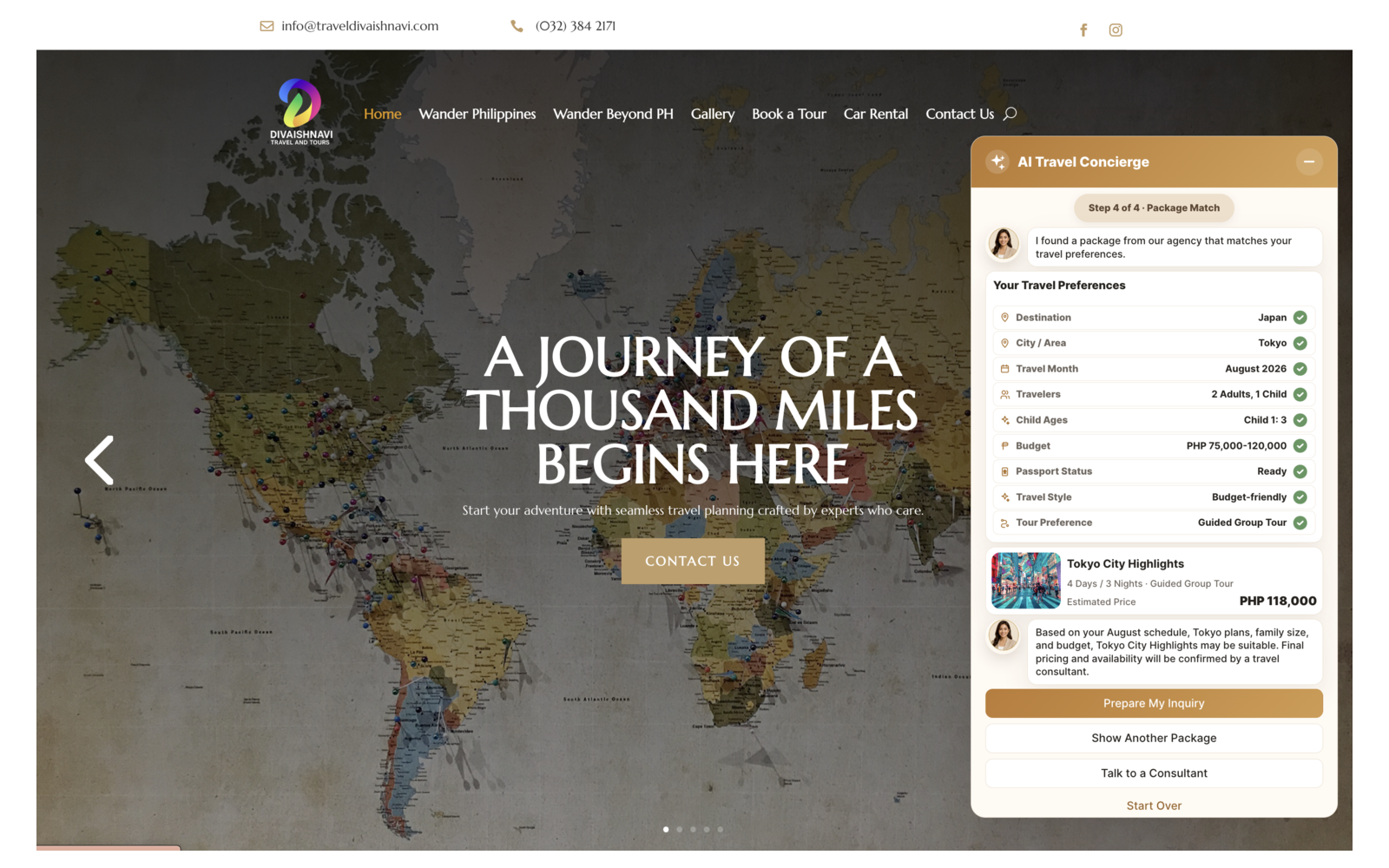
Visitor Experience
AI-assisted preference gathering and package matching on the public website.
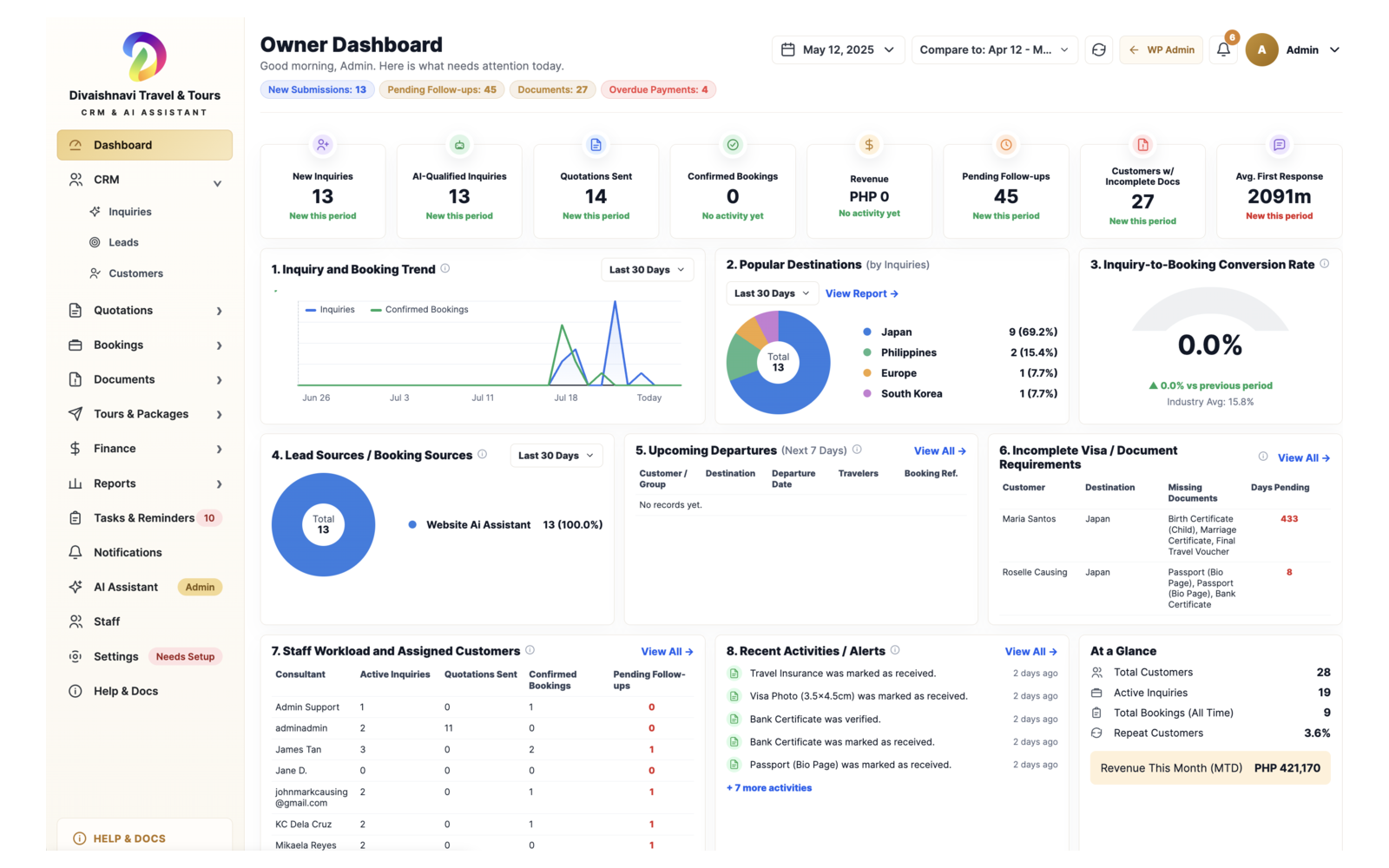
Owner Dashboard
A central view of inquiries, quotations, bookings, documents, follow-ups, reports, and staff activity.
COMMUNITY MANAGEMENT
Homeowners Portal System
Separate homeowner and administrator experiences bring accounts, payments, properties, announcements, service requests, documents, amenities, and community operations into one connected system.
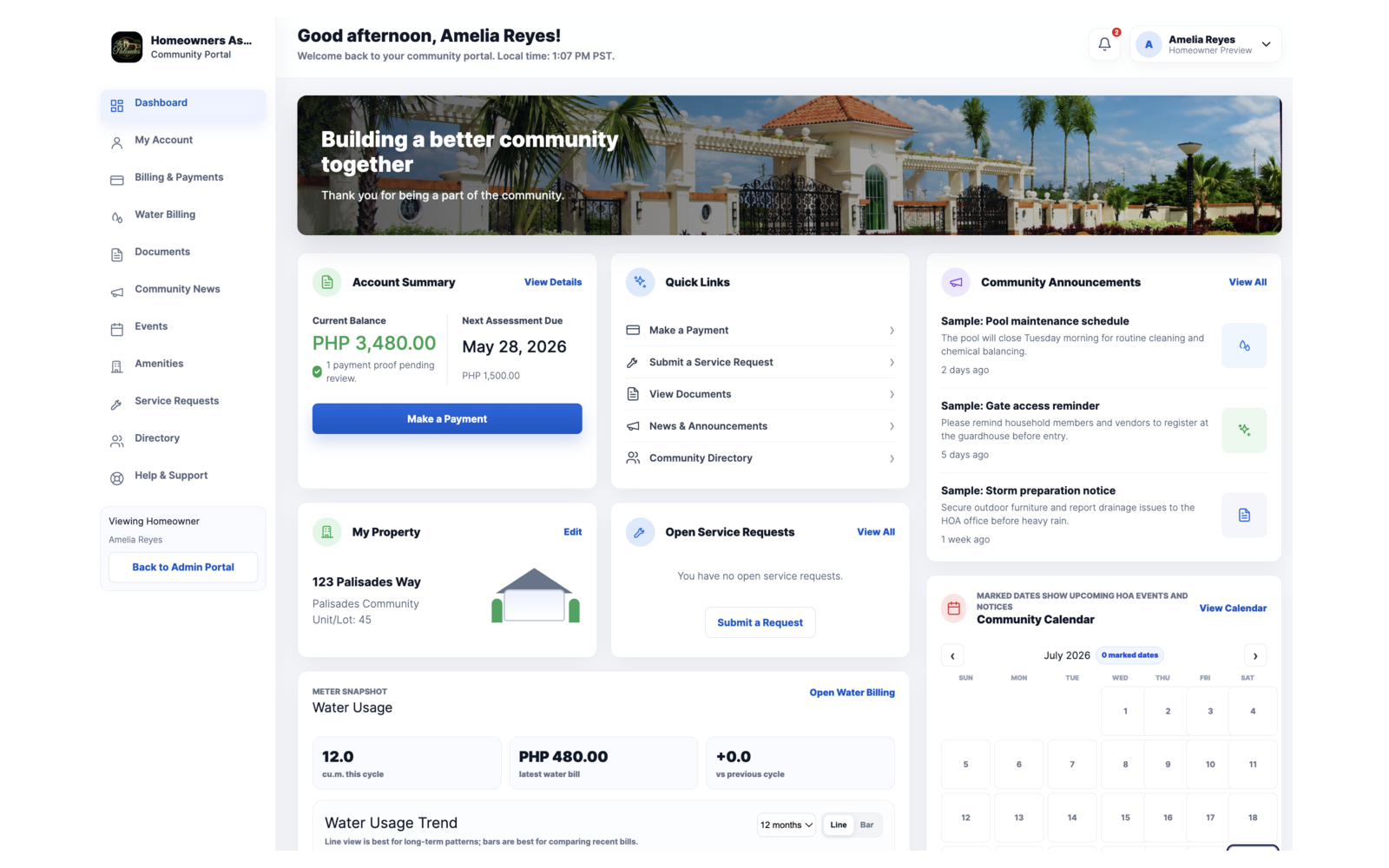
Homeowner Dashboard
Resident access to balances, payments, property details, requests, announcements, events, and water usage.
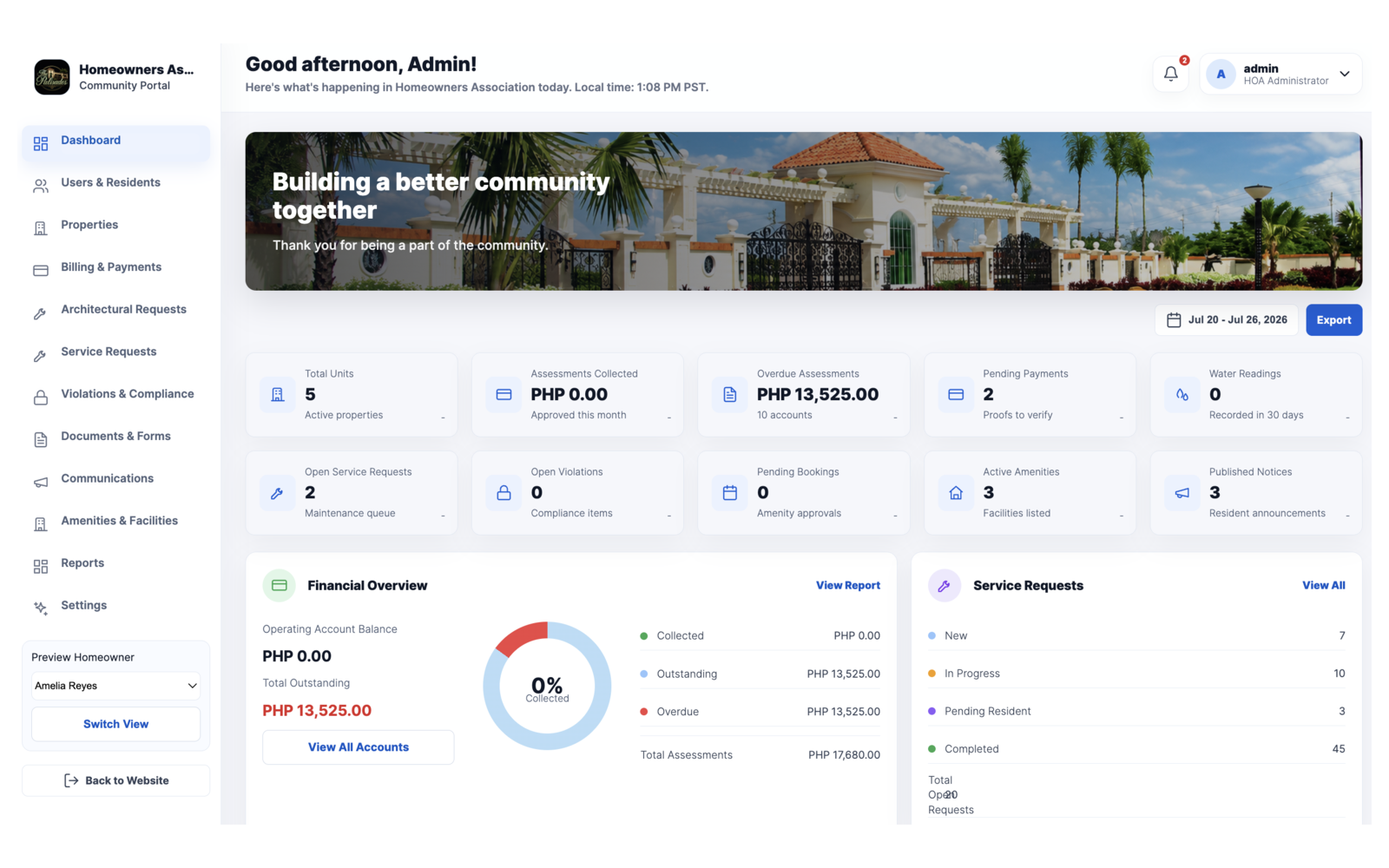
Administrator Dashboard
Management tools for properties, assessments, payments, compliance, amenities, communications, and reporting.
ECOMMERCE OPERATIONS
ROKMIL Order Flow
A staff dashboard for managing order requests, reported payments, inventory, customer verification, and pickup, delivery, shipping, or in-house fulfillment.
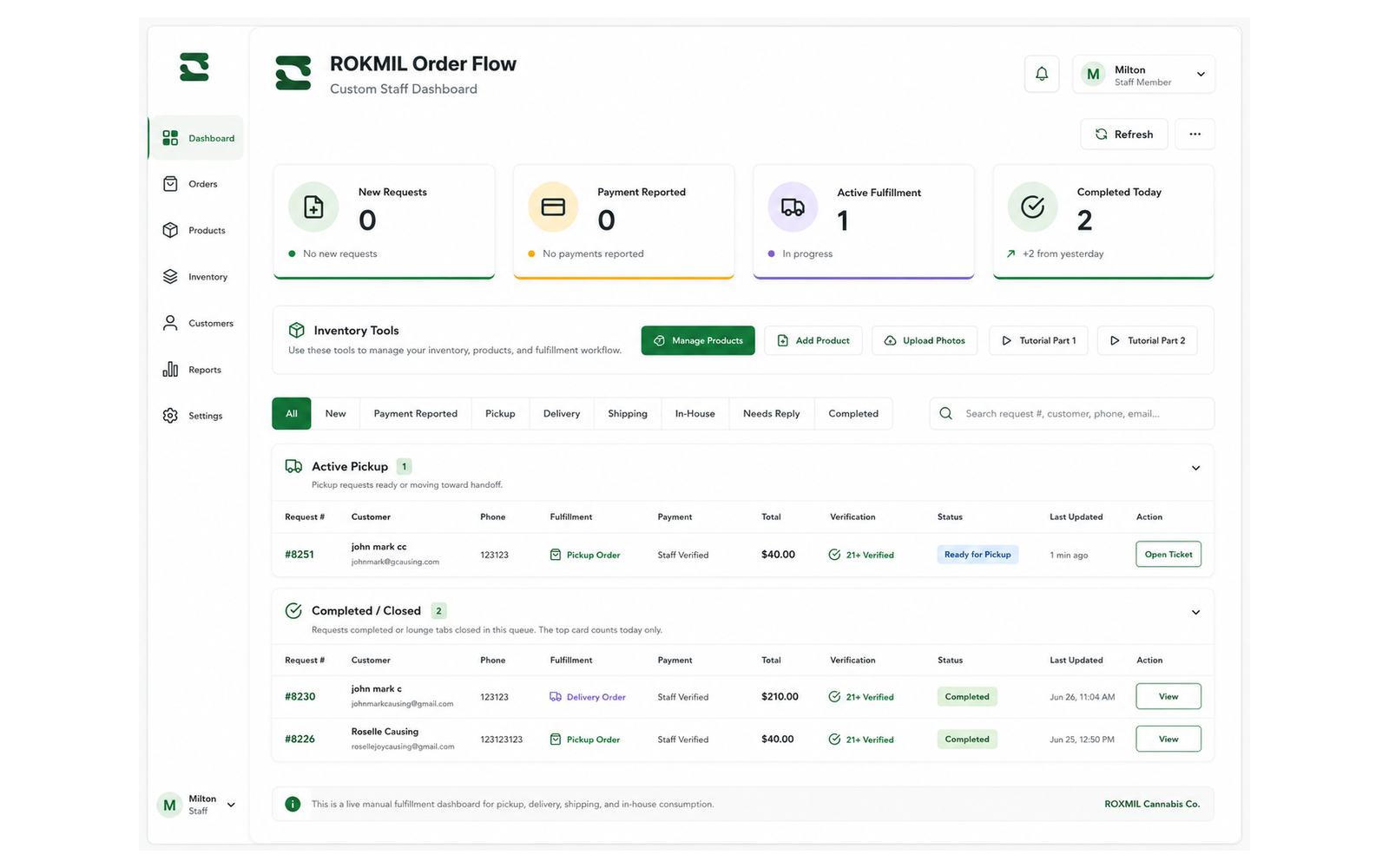
Staff Fulfillment Dashboard
One operational view for active requests, completed orders, inventory tools, payment states, verification, and fulfillment status.
WHAT WE CAN BUILD
Practical Tools for Customers and Teams
The right system depends on your workflow. We organize the information, responsibilities, and actions that matter most to your business.
Customer Operations
Inquiries, customer records, quotations, bookings, orders, payments, documents, follow-ups, and activity history.
Portals & Dashboards
Clear private workspaces for staff, managers, customers, members, residents, or account holders.
AI & Automation
Focused assistants, assignments, reminders, notifications, status updates, and reports with human control where it matters.
HOW IT CONNECTS
From Customer Request to Completed Work
A connected workflow keeps the customer experience simple while giving your team a clear record of what should happen next.
1. Request
A customer submits an inquiry, order, booking, application, document, or service request.
2. Review & Action
The request reaches the right dashboard so staff can review, assign, update, and follow up.
3. Complete & Retain
Confirmation, payment, fulfillment, or approval is recorded for future service and reporting.
FREQUENTLY ASKED QUESTIONS
Questions About Custom Business Systems
Clear answers about connecting websites, portals, dashboards, automation, and AI tools.
Can a custom system connect to my existing website?
Yes. A system can be connected to an existing WordPress website or planned as part of a new website project.
Do we need to replace every tool we already use?
Not necessarily. We first study the current process and identify what should remain, what can connect, and what is worth simplifying.
Can customers and staff have different dashboards?
Yes. Different user roles can receive different views, information, and actions based on what they are allowed to access.
Can the system include payments, documents, or notifications?
Those features can be included when they fit the workflow and the required payment, storage, and communication services are confirmed.
Where does AI help, and where is regular automation better?
AI is useful for guided questions, approved information, summaries, and drafts. Predictable tasks such as assignments, reminders, and status updates often work better with clear rules.
How do we start if our process is not documented?
Start by showing us how your team handles requests today. We can map the steps, identify gaps, and recommend a practical first version.
START WITH YOUR CURRENT PROCESS
Tell Us How Your Team Handles Requests Today
We will help identify what should stay, what can be simplified, and what may be worth automating.