


Commerce Operations by Causing Designs
E-commerce Order Management System
Give staff one organized workflow for customer order requests, reported payments, verification, inventory, pickup, delivery, shipping, and completion.
ECOMMERCE OPERATIONS
Connect Order Requests to Staff Fulfillment
A focused operational system can support the steps that happen after a customer submits an order, especially when fulfillment includes manual review or multiple delivery methods.
Customer Order Requests
Capture products, quantities, customer details, fulfillment choice, verification information, and supporting files.
Staff Fulfillment Dashboard
Move requests through new, payment-reported, pickup, delivery, shipping, in-house, reply-needed, and completed queues.
Inventory & Payment Tracking
Connect product tools, stock information, reported payments, staff verification, customer status, and fulfillment history.
REAL SYSTEM PREVIEW
A Focused Dashboard for Active and Completed Orders
The ROKMIL Order Flow interface demonstrates how staff can review operational counts, manage inventory tools, filter request queues, and open individual order tickets.
ROKMIL ORDER FLOW
One Operational View for Manual Fulfillment
Active requests, payment status, verification, order totals, fulfillment type, customer information, and completed work remain visible in one staff-focused system.
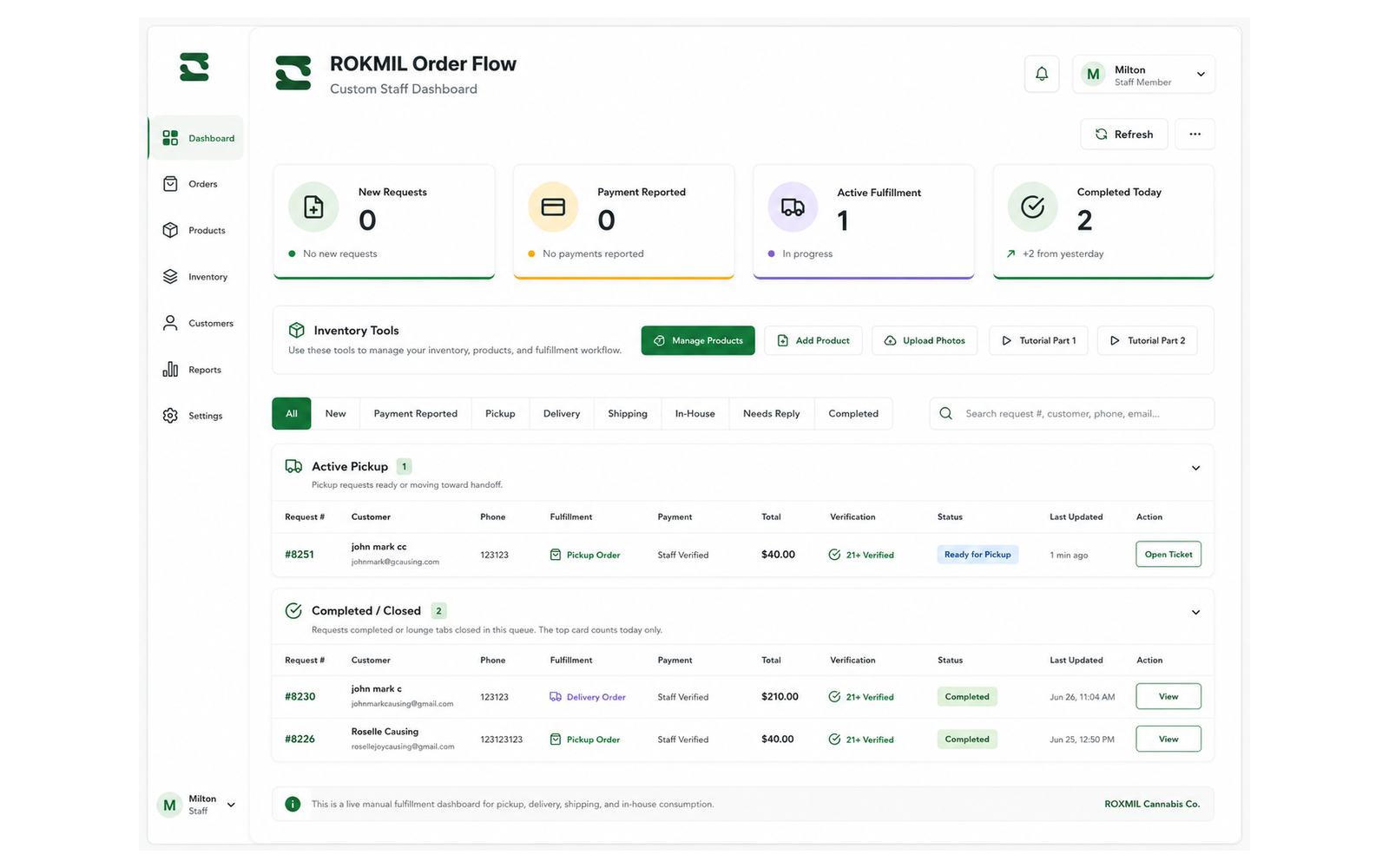
Staff Fulfillment Dashboard
One operational view for active requests, completed orders, inventory tools, payment states, verification, and fulfillment status.
WHAT IT CAN MANAGE
Order Tools Built Around Your Fulfillment Process
The workflow can reflect how your team sells, confirms payment, manages inventory, prepares orders, and hands them to the customer.
Order Queues
Organize requests by new, payment reported, pickup, delivery, shipping, in-house, needs reply, active fulfillment, and completed status.
Payments & Verification
Record reported payments, staff verification, customer requirements, supporting files, totals, and issues needing attention.
Inventory & Fulfillment
Manage products, stock details, order tickets, pickup readiness, delivery or shipping progress, and completion history.
HOW IT WORKS
From New Request to Completed Order
Customers receive clear status while staff can see the next required action and retain a record of what was completed.
1. New Request
The customer submits products, contact details, preferred fulfillment method, and required verification information.
2. Verify & Fulfill
Staff reviews payment and requirements, confirms stock, updates the ticket, and prepares pickup, delivery, shipping, or in-house service.
3. Complete & Retain
The completed order remains available for customer support, inventory review, reporting, and repeat-service history.
FREQUENTLY ASKED QUESTIONS
Questions About Order Management Systems
Clear answers about order requests, payment reporting, inventory, verification, fulfillment, and staff access.
Can this connect to an existing online store?
Yes. The operational dashboard can connect to an existing WordPress or WooCommerce website when the current setup and required integrations are suitable.
Can it support pickup, delivery, and shipping?
Yes. Different fulfillment types can have their own information, statuses, staff actions, and customer updates.
Can customers report payment or upload proof?
Yes. Payment reporting, reference details, uploads, review status, and staff verification can be included.
Can it manage inventory and products?
Product records, photos, stock details, availability, order allocation, and inventory tools can be included based on the required level of control.
Can different staff members have different permissions?
Yes. Roles can limit access to orders, products, inventory, reports, settings, and administrative actions.
How do we plan an order workflow?
Show us how orders arrive, how payment is confirmed, how stock is checked, and how pickup, delivery, or shipping is completed. We will map the practical first version.
PLAN YOUR ORDER WORKFLOW
Show Us How Your Team Fulfills Orders Today
We can help organize customer requests, payment review, inventory, staff queues, pickup, delivery, shipping, and completion.