Role-based access for business systems should reflect real responsibilities rather than job titles alone. A person may need to view one record, update another, and never see a third.
Good access planning supports privacy, reduces accidental changes, and makes sensitive actions easier to review.
Start with records and actions
List the record types in the system, such as customers, orders, payments, documents, properties, requests, reports, and user accounts. For each record, identify actions including view, create, edit, verify, approve, export, delete, and configure.
Define roles from responsibilities
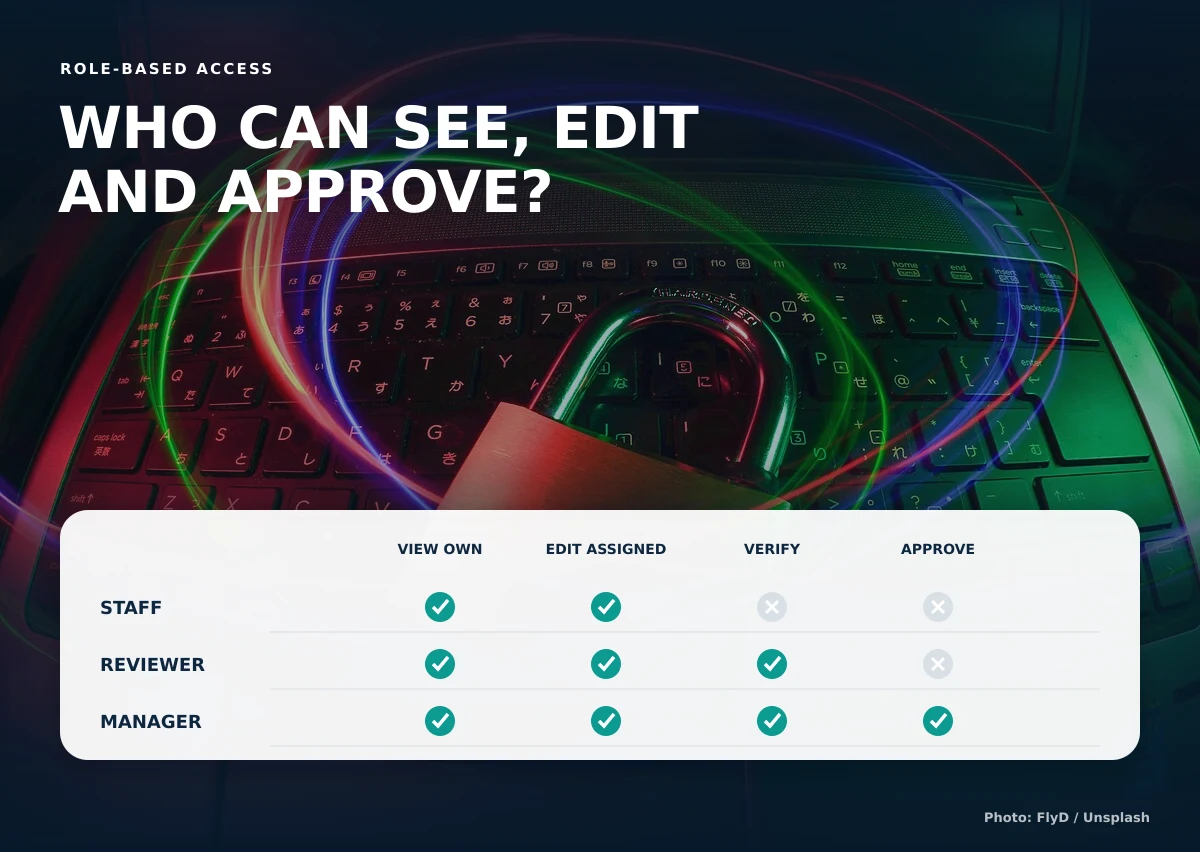
A staff role may update assigned requests. A reviewer may verify payment details. A manager may approve exceptions and view broader reports. A customer may see only records connected to the customer’s own account.
Use least privilege as the starting point
Grant the smallest level of access needed to complete the work, then add justified permissions. OWASP recommends designing authorization early, denying by default, applying least privilege, and validating permissions on every request in its authorization guidance.
Consider record-level access
The ability to view “orders” does not necessarily mean every order. Access may depend on assignment, branch, department, property, customer relationship, or another business rule.
Separate preparation from approval
Sensitive processes benefit from separating the person who prepares a change from the person who verifies or approves it. Examples include payments, refunds, account adjustments, document acceptance, and high-value orders.
Review access when responsibilities change
Remove or adjust access when staff move roles, leave the organization, or no longer need a function. Keep account administration restricted and review privileged roles regularly.
Example permission questions
| Question | Reason |
|---|---|
| Can users see only assigned records? | Limits unnecessary exposure |
| Who can verify a payment? | Protects financial workflow |
| Who can export customer information? | Controls bulk access |
| Who can change statuses or balances? | Protects record integrity |
| Are important actions recorded? | Supports review and accountability |
Document permissions in a matrix that business owners can review. Each row should describe a record or important action, and each column should represent a role. Use explicit labels such as own records, assigned records, branch records, all records, prepare, verify, approve, export, and administer. A simple yes-or-no table can hide important conditions, especially when access depends on assignment or account relationships.
Test authorization with realistic negative cases, not only successful ones. Confirm that a customer cannot change an address in the page URL to view another customer’s request, that staff cannot approve their own restricted action, and that exported files follow the same permission rules as onscreen data. Record important administrative and financial actions with the actor and time. Permissions should be enforced by the server for every request; hiding a button in the interface is not sufficient protection.
Create an access-change process as well. Managers should request the role, the system owner should approve sensitive access, and administrators should record the change. Review dormant accounts and privileged roles on a regular schedule, with faster removal when a person leaves or changes responsibility.
Causing Designs plans role-aware portals and dashboards around the people who actually perform the work.
To define role-based access for business systems, discuss your users, records, and approval steps with us.